OK, talk to me like I am five years old....

tjlmbklr

AzB Silver Member
Silver Member
If this post looks formiliar then we have some die hard pool players out there. I know several people ask this same question. I want to post pictures on my post. Not a "link" the actual picture, I have seen it done. Every time I try to do it the recommended way I have trouble getting to work. And some may laugh at my lack of, yet still improving day to day, "computer skills". But I tried writing in a "word" Doc. adding the picture then copy and paste to my post, well obviously this did not work. I just want post the pictures of my partially finished Rec. room.

Just help a brother out please.
 
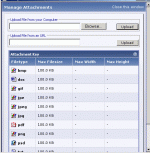
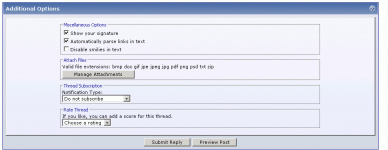
when you go to make a post scroll down to “additional options” and click "manage attachments" , you will see the screen like I have copied. Click "browse" navigate to your picture and click "upload" (must be less than 100k) close the window.

If you only have one image as an attachment it will display. If you have more than 1 image they will be links.
 

Attachments

  • attachement_mgr.gif
    attachement_mgr.gif
    18.8 KB · Views: 151
  • additional_options.gif
    additional_options.gif
    25 KB · Views: 126
Last edited:
Thannks that seems easy enough, unfortionately I was a BD forum user for a great while and they do not have this option...Or at least I think.
 
You could also put the pic on another server so AZB does not have to provide the bandwidth for it... You could also post larger pics that way...
 
Back
Top