When I log in that is. I have to log in each time I get on even if I have checked the "Remember Me" box. Any help would be appreciated.
Thanks,
Thanks,


Timberly,Timberly said:If I am inactive or typing up a lengthy response, I get booted from the site. It's annoying but I'm used to it.

LOL, after losing some pretty good posts, I now copy the post before clicking submit. I can't begin to tell you how mad I was the first time it happend! I should've learned then but it took me losing yet another one before I finally got the point.RSB-Refugee said:Timberly,
This won't keep you from getting the boot, but if you plan on typing a long post, type it in Word then copy and paste it to the site. It iz allso uh quik ezee wae to speel chek it.
Tracy


Worminator said:When I log in that is. I have to log in each time I get on even if I have checked the "Remember Me" box. Any help would be appreciated.
Thanks,
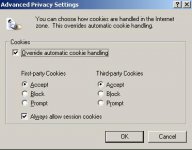
GRRRR, this is my frustration!! MY settings haven't changed. The software did, why would my settings change???Koop said:If that doesn't work, make sure your settings allow you to store cookies.
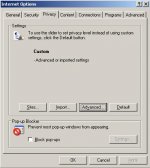
Click on Tools - Internet Options
Click Advanced Settings to make sure everything is enabled.
HTH,
Koop


Timberly said:GRRRR, this is my frustration!! MY settings haven't changed. The software did, why would my settings change???


Worminator said:Why Doesn't AZB Remember Me...
AuntyDan said:I had this exact same problem after The Changeover. I found none of the standard suggestions (Clearing out all Cookies, allowing all Cookies etc.) above worked for 2 different Windows XP Pro SP2 systems I use.
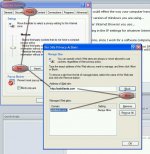
What DID work for me (and this is preferable to allowing ALL sites to add any cookie they want anyway) was to manually add AZBilliards.com to Managed sites using the Internet Privacy settings.
Here's how to do it (Under Windows XP):
1) Open the Control Panel
2) Open the Internet Options control panel
3) Select the Privacy Tab
4) Click the Sites button
5) Type in "http://azbilliards.com" in the Address
6) Click the Allow button
7) Click OK and exit the control panel.
8) Close and relaunch Internet Explorer.
HTH
AuntyDan said:I had this exact same problem after The Changeover. I found none of the standard suggestions (Clearing out all Cookies, allowing all Cookies etc.) above worked for 2 different Windows XP Pro SP2 systems I use.
Ummagumma said:Sometimes the Index.dat file (there's one each for Cookies, History and Temporary Internet Files) gets corrupt, which can cause issues. But you can't really delete it because it's in use. You might be able to kill the Explorer.exe and Iexplore.exe processes but usually there's a handle locked on it.
AuntyDan said:Thanks for the suggestions. Yes, I agree the issue is odd and, FWIW, it has happened on three seperate systems I have used since The Change.
Ummagumma said:What's this change that everyone keeps talking about? A change from one brand of message board software to another brand? Or a vBulletin upgrade from older to newer version?
AuntyDan said:They upgraded the version of vBulletin about 3 months ago now. Many people who'd never had logon issues before that started getting them after this. In theory clearing the Cookie and Browser cache should have been the solution for everyone, but for some odd reason it was not. Perhaps it is not so much that the new vBulletin software is bad but that the old version was too lax in logon enforcement?
I did this and this....AuntyDan said:Here's how to do it (Under Windows XP):
1) Open the Control Panel
2) Open the Internet Options control panel
3) Select the Privacy Tab
4) Click the Sites button
5) Type in "http://azbilliards.com" in the Address
6) Click the Allow button
7) Click OK and exit the control panel.
8) Close and relaunch Internet Explorer.
HTH
I also checked on "remember me". After being idle for awhile, I still got booted from the site.Koop said:If that doesn't work, make sure your settings allow you to store cookies.
Click on Tools - Internet Options
Click Advanced Settings to make sure everything is enabled.
HTH,
Koop
 ( my cookies & temp files have been cleaned out also)