
Edit:
The original compatibility check had a typo in it virtually guaranteeing that everyone would fail the check:
The line "Send G0 360 A axis must rotate 1 turn CCW as viewed from tailstock"
should have been:
Send G0 A360 A axis must rotate 1 turn CCW as viewed from tailstock
Thanks Alan P. for pointing this out.
This is why an app is helpful. It doesn't make typos.
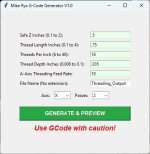
Want to easily cut great external threads on your CNC?
Enter:
Thread Length
TPI
Thread Depth
Feed Rate
FileName
Press the GENERATE button to create ready-to-run G-Code files for creating great external threads. It’s that simple.
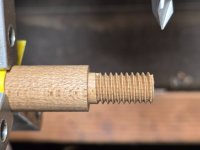
Mount your item with a properly sized tenon extended. Set and zero all axes as described in the included User Guide. Load the G-code file into your G-Code sender and create threads.
You can thread tenons for: ferrules, A-joints, butt caps, joint collars, carom shafts with wooden pins. You can make your own lathe pins from Delrin and use them for finishing. Thread Hydex 202 plugs for shafts.
Requirements:
Windows 10 or higher for the App. If you're using an older computer like XP you could use the App on any modern Windows PC, generate the G-code file and transfer the G-code to the XP PC using a flash drive (2.0 or 1.0).
CNC Compatibility test:
Zero the A axis
Send G92.1 Ensure all temporary work offsets are off
Send G0 A360 A axis must rotate 1 turn CCW as viewed from tailstock
Send G92 A0 A Axis DRO goes to zero without moving
Send G92.1 The A Axis DRO will revert back to 360 without moving
If your CNC passes these simple tests, the App should work for you.
If your CNC does NOT meet these tests, the threading app WILL NOT work for you.
If you’re not 100% satisfied, contact me for a full refund. It comes with a simple User Guide and a Setup Video that describes how to use the App.
DM to purchase.
The original compatibility check had a typo in it virtually guaranteeing that everyone would fail the check:
The line "Send G0 360 A axis must rotate 1 turn CCW as viewed from tailstock"
should have been:
Send G0 A360 A axis must rotate 1 turn CCW as viewed from tailstock
Thanks Alan P. for pointing this out.
This is why an app is helpful. It doesn't make typos.
Want to easily cut great external threads on your CNC?
Enter:
Thread Length
TPI
Thread Depth
Feed Rate
FileName
Press the GENERATE button to create ready-to-run G-Code files for creating great external threads. It’s that simple.
Mount your item with a properly sized tenon extended. Set and zero all axes as described in the included User Guide. Load the G-code file into your G-Code sender and create threads.
You can thread tenons for: ferrules, A-joints, butt caps, joint collars, carom shafts with wooden pins. You can make your own lathe pins from Delrin and use them for finishing. Thread Hydex 202 plugs for shafts.
Requirements:
Windows 10 or higher for the App. If you're using an older computer like XP you could use the App on any modern Windows PC, generate the G-code file and transfer the G-code to the XP PC using a flash drive (2.0 or 1.0).
CNC Compatibility test:
Zero the A axis
Send G92.1 Ensure all temporary work offsets are off
Send G0 A360 A axis must rotate 1 turn CCW as viewed from tailstock
Send G92 A0 A Axis DRO goes to zero without moving
Send G92.1 The A Axis DRO will revert back to 360 without moving
If your CNC passes these simple tests, the App should work for you.
If your CNC does NOT meet these tests, the threading app WILL NOT work for you.
If you’re not 100% satisfied, contact me for a full refund. It comes with a simple User Guide and a Setup Video that describes how to use the App.
DM to purchase.
Attachments
Last edited: