
SSDiver2112
Esscot Custom Cues
Past couple of days the tool bar is disabled. Can’t bold, add links or pictures. All are grayed out.



i never see that on my phoneIf you can't find this option from your phone, try enabling "desktop site" and you'll see it.
View attachment 712776
if it's a windows laptop there's a snipping tool program, part of windows, you can bring up the large picture you can't upload and take a snip and the size will be way smaller, that you can upload.I tried numerous times and can't do it. I use a laptop.
It will help if you scroll up a little. The settings are there, you just have to click the 3 dots to expand the menu.this what i see on my IPHONE
View attachment 712812
i will check it outIt will help if you scroll up a little. The settings are there, you just have to click the 3 dots to expand the menu.
i still dont see itIt will help if you scroll up a little. The settings are there, you just have to click the 3 dots to expand the menu.
You have to toggle BB code. It is an option so that you can edit the code manually if you want to. I think on a phone it is off by default.
The option is there, but you have to expand the menu by clicking the 3 dots next to it to expand them.
Desktop:
View attachment 712776
Phone:
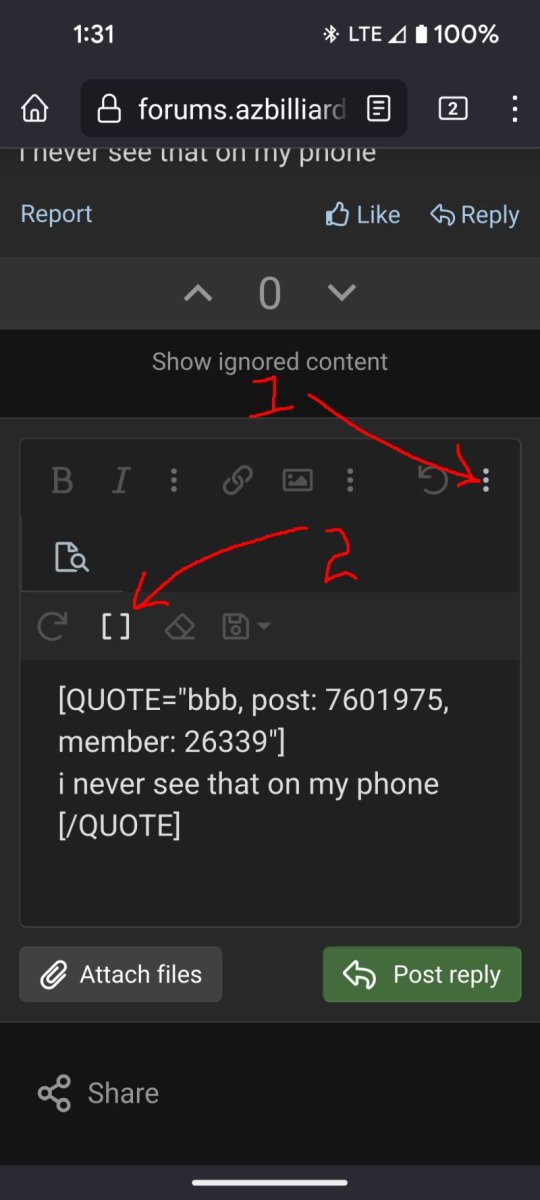
i still dont see it
i take pics and then up load them
no need to spend more time on this
thanks for trying to help
this is from this morning
i dont see a "show ignored content " or those 3 dots
View attachment 712858


