
Camera set up

IntoTheRail

AzB Silver Member
Silver Member
Hello,

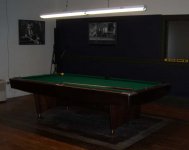
I want to put a video camera setup in my place to record myself playing pool. Im looking for any ideas, problems, recommended equipment. Im not very handy with audio/video stuff but my basic though was to put a camera in the corner kind of high up and put a table there with a laptop and an external hd. I want to spend the least amoutn of money possible but still get good quality. Any ideas would be helpful, picking out the actual camera seems like the most important part and I dont have a clue as to what I would need. Here is a picture of my table area so you can get an idea of whats going on. Thanks!
 

Attachments

  • table.jpg
    table.jpg
    27.8 KB · Views: 826
I'm there, doing that. First, be prepared for a lot of frustration.

I have two camcorders. A Sony HDR-SR1 which has a hard drive. This was a pretty expensive camera originaly. It sold for $1600.00 but it was discontinued and I got it on sale for about half of that. Now i think that you can buy it's equivalent for about $600.00 and there are less expensive ones that will do the job.

The second one is a Cannon ZR 800 which has a tape drive. This one cost about $280.00 when I bought it but sells for less now.

The frustration comes mostly in the software and tech(or lack thereof)support.

I would recommend that you start with a cheap one. I would avoid JVC. I had two of them and returned them both. They just did not work well.

Let me know what you do and feel free to question me though I'm sure there are many others one the site who can give you better advice than me.

Dave Nelson
 
I bought a Kodak Z16 ? on Woot for $69.00 and attached it to a tripod. It has a memory card internally, and will accept another for a total of 32. It comes with software to edit on your PC. It can record up to about four hours of video and audio. The quality of the video is STUNNING!! It records still pictures as well. There are many adjustments for HD, close up, etc. The newer version of the camara I have seen for $169.00. It is very compact, like a large cell phone and comes with rechargable batteries and charger. I hooked it up to my 27" TV, and the picture is great. Highly recommend it! Good luck
 
DD

That's good advice. I wish I had had it before I plunged in. I could have saved a lot of money and frustration.

Dave Nelson
 
What camera you choose doesn't really matter. What's more important is the lighting.

If you've ever seen a televised match, you may have noticed the ridiculous amount of light that is used. This is because cameras LOVE light. You want it to be as bright as possible in there.

The quality of the light is also important. You want to generate light from the largest source as possible, creating what we call 'soft light'. It gets rid of those harsh shadows and puts a nice specular on anything reflective or shiny. That's why you usually see photographers shooting with reflective umbrellas and light boxes. It increases the size of the light source and softens the picture.

The large powerful light usually goes overhead in TV matches, but that's because they need to be able to film the action from every angle. Seeing as you're probably using only a single camera on a tripod, you can cheat and just put one 'fill' light about 10' to the side of your camera, and then keep that florescent on that's your current overhead table light.

You'll be mixing color temperatures now...lol (unless you get a big compact florescent bulb for this secondary light), but I'm definitely not going to get into that.

Chances are I went into way more detail then you cared to hear anyway. :p
 
Thanks for all the advice. I think I should be good with the lighting, even though the picture doesnt show it that light above my table is serious overkill. I was checking out color security cameras at work today and I think they might be what I end up going with. Price is about the same and they come with the wall mounting hardware.....I can even get it motion activated so it starts recording when there is activity at the table lol. They probably dont come with editing software though so that could become a challenge.
 
I really do not have much problem transferring from the camera to the computer. That works pretty well with either camera. Nor do I have a problem playing the camera directly to the T.V. Most of my problems and frustrations result from creating DVDs. Sony attempts to force you into the AVCHD format. This will only play through an AVCHD player. It is imcompatible with everything else. You can record in a compatible format, but Sony would have you believe that it will take a long time and be inferior in definition. It does take longer because Sony has deliberately bugged the software to make it do so. There is no difference in definition. I have recorded the same clip in both formats and compared them. If there is a difference I could not see it.

Do I sound like Im pist at Sony? Better believe it.

Dave Nelson
 
Back
Top