Need advice on a "at home" camera recording setup!

filluptieu

AzB Silver Member
Silver Member
Hi folks,

About to get a table real soon and would like to get some advice on picking out a camera and program to help me record matches.

I dont need anything crazy just good enough to have a nice clear video. Also, I need advice on a program to use in order to record these matches. Since the camera will be mounted high up, I would like a computer of some sort to have control. Advice on what to use here would be a big help as well.

And for those wondering, I will be using a LED panel in a box with the egg crate as a light dampener. This light will be pretty high up. I have 12 foot ceilings so I plan to have it hang about 3 foot from the ceiling. The table is a 9 foot diamond with tournament blue cloth.

Simplicity is probably the most important for me. Ideally, a gopro mounted (since its small and descrete) would be awesome but not sure if you can use a gopro by have the live video feed come out from the gopro unit to a computer?

Any advice would be great! thanks everyone!
 
I have the exact setup you want. I'll try to round up what you need tomorrow. I might have made a post before, I'll see if I can find it.
 
Could you share that info.
I'm not able to climb a latter to install 2nd story cameras.

Wiring would be almost impossible.

Sounds like I'm going to have to pay someone?

Thanks

Sent from my SCH-I545 using Tapatalk
 
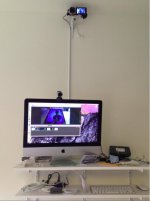
This is my experience.... It works for me, but there may be better ways...

Also, this is only for a Mac. I don't have any idea how to do it in Windows.

Camera:
1. You need a camera that has HDMI out.
2. The camera is "best" if it has manual controls for the focus, and manual controls for the white balance. This way you can lock them. If it does not, the picture will change a lot every time you walk in the path of the camera.
3. You can easily find a brand new camera like this in the $500 range. They might be cheaper now, I got mine in 2013. Used works great too.
4. Nothing else on the camera matters as far as features. You will be bypassing them all, when you use the HDMI out.

Computer:
1. You need a Mac computer, preferably with a quad core processors.
2. The computer must have a Thunderbolt input port.
3. All Mac's made after late 2011 have this port.
4. I got a used iMac on eBay last year for $400 that met this criterea.

Connecting the camera to the computer:
1. You need an HDMI cable to go from the camera to #2 below.
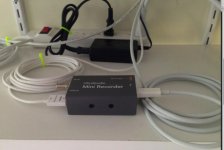
2. You need a Blackmagic Studios UltraStudio Mini Recorder. This will accept the HDMI wire from the camera on its input, and on its output, send the signal to the Thunderbolt cable. This device costs $140.
3. The Thunderbolt cable then connects to your computer.

Software:
1. What you are doing with this overall setup, is taking the uncompressed video from the camera's HDMI output, (which bypasses the camera's internal computer, and flash card), and then using the computer software and the computer processor to convert to a video format that can be stored on your hard drive, and/or shared to youtube, and/or streamed live.
2. This software is known as streaming software, or encoding software.
3. There is a free one Flash Media Live Encoder http://www.adobe.com/products/flash-media-encoder.html
I have not had success with this one, but others have.
4. The one I use is called "Wirecast". It is not free, its $500. I have an a-hem "borrowed" copy of it.
5. With this software, you start and stop the recording from your keyboard. You NEVER have to touch the camera (once the focus and white balance is set). It stays on 24 hrs a day. This software allows you to encode in 720 or 1080 and set the frames per second, and the quality. All of these influence the file size of the resultant recording you make.
6. For me, I use a resolution of 1280x720, 24 frames per second, and 500 kilo bits per second recording rate. It looks great to me, and the file sizes are tiny. Like 100 MB for 30 minutes of recording.

Screen Shot 2015-10-10 at 12.48.51 PM.jpg

Screen Shot 2015-10-10 at 12.49.03 PM.jpg
 
Back
Top