
How to post pic's made easy !!

wjpjr

modulator
Silver Member
I see some of you new guys are having a hard time !
(1) After you do your description of your cue hit the enter button (this brings your cursor to the beginning of a new line)
(2) The little stamp just to the right of center on the top of the thread window with the mountain in it click it .
(3) A new window will appear with a HTTP in the box . hit backspace (erase it).
(4) copy/paste your pic address in the blank window and hit Go/enter (This will put it in the body of the thread).
(5) Hit enter again ( this brings your cursor back to a new line and stacks the pic's top to bottom instead of side by side) !!
(6) repeat steps 2-5 for multi pic's

Hope this helps !!
Bill
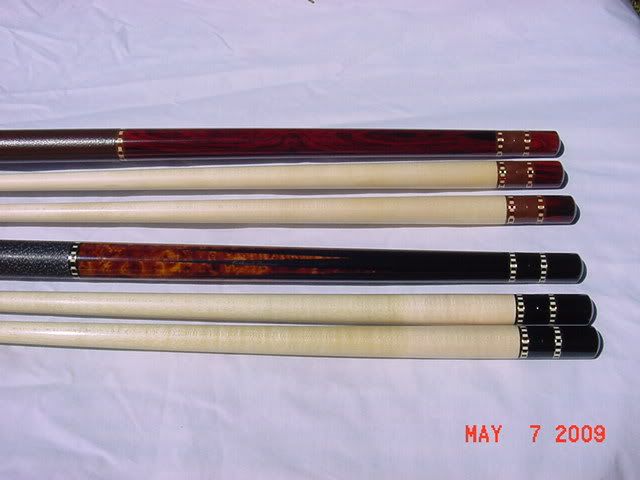
Bluegrasscues002.jpg

Bluegrasscues004.jpg
 
Last edited:
thanks

I'm sure I speak for others too. Thanks for taking the time to share this!
 
Question

Not a problem ! Your more than welcome .
Now go post some stuff for sale .. :thumbup:
Bill

What are the picture file size limits for this method?


I like the photobucket method best as I don't have to resize my picture file size. You can then post some nice hi-res pictures with no problems.

Kevin
 
What are the picture file size limits for this method?


I like the photobucket method best as I don't have to resize my picture file size. You can then post some nice hi-res pictures with no problems.

Kevin

I'm not sure . I also have been using photobucket for years with no issues
 
Nice Pictures

Bill,
" Rich has told Me many times about Your Ebony & Burl Bluegrass...
Thats a really sharp cue ;)
 
Bill,
" Rich has told Me many times about Your Ebony & Burl Bluegrass...
Thats a really sharp cue ;)

LOL Yea he's been after me for a couple years (since I got it) to sell it to him.
We're friends but not that good of friends !! :grin-square:
Here's a few more ... FYI That's my playing cue and it plays better than it looks ..

Bluegrasscues005.jpg

Bluegrasscues007.jpg
 
Last edited:
This thread is so funny.
While I was out at lunch today, I was thinking about coming back from lunch and posting a thread wanting to know the technique to post the pics.

LOL
 
yup

and without more info it still won't be EZ. That program I just posted is a good start though. Saves small copies in batches of all the photos you want to resize and then they can be uploaded from your computer right into the thread. Personally I don't want to have to click a link to see the photo. Pain in the @$$. :D then the link has to be closed ..... and so on and so on .... lol
 
This topic should be a sticky.

Question: Is it possible to post a pic without a web address? i.e. Post a picture save locally to this site.
 
Quick note: Using
will only work if the URL you're working with ends in .jpg for example http://XXXXX.XXX/XXXXXXX.jpg

To isolate the photo from a different server. Simply right click on the photo and click "view image" It should send you to a page with nothing but your picture. Now look at the URL and you'll see the .jpg extension.

Some sites, such as flickr, do not use the standard URL for individual photos. Flickr URL's look more like http://XXXXXX.XXX/XXXXX.jpgXXXXX Keep in mind that if there is anything after the .jpg extension, the image will not properly post on AZB. There are a few image hosting sites that use this type of format in the URL.

That covers the remote photo hosting. To upload directly from your harddrive, you'll have to click "manage attachments" in the "Post Reply" page. You can only do this from the advanced reply page...it doesn't work from the Quick Reply box. Make sure to always keep pop-ups enabled for AZB. When you click on Manage Attachments, a window will appear. You can upload a maximum of 5 files per reply. Click "browse for file" and find the picture on your computer and then click upload. That's it, now it'll show in your post.
 
Back
Top