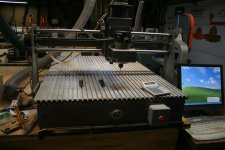
inexpensive CNC machine ...

Maybe.....

I noticed that one too. I haven't contacted the seller yet to see what kind on tolerance they feel the machine will hold. If they use cheap lead screws and don't have anti-backlash nuts, it probably won't hold the tolerances needed for inlay work. I've contacted other CNC sellers that are honest and say that their machines will probably only hold +-.005. That's fine for sign making, but would be pretty ugly for inlays.

It also doesn't include electronics, steppers or software. That makes this "cheap" entry not so cheap.

I've been looking at machines for quite a while and I'm coming to the conclusion that you can't get a "cheap" setup that will hold the tolerances needed.
 
This is the one that I just bought about a month ago for about $1200. The only things needed was a computer, and a dremel. I had him build it to different diminsions, to hold a cue. I have only ran a couple test runs to see if it worked, been real busy with day job. I also have been modifiying it by putting on 'T' slot bed from 8020 inc. and mounted a PC router to it with a mount from K2cnc. I'll post some pics later today. Now, I just have to figure out how to run it:D
Dave
http://cgi.ebay.com/CNC-Router-Mill...ryZ57122QQssPageNameZWDVWQQrdZ1QQcmdZViewItem
 
Dave a few things i thought i might share with you the dremel will not work well with doing inlays to much run out the next best idea is a router less run out but still not as precise the Kress might work the best for the bucks
i have a Gantry style machine the only thing is to much movement in the carriage both those and the run out will cause you many inlay problems
i have gone Thur these when i started out i found the Taig very rigid and with the Kress combo as a spindle they both work well hand in hand
the 80/20 bed will help i did that on my gantry system thats a positive move.when i first started with cnc i had 2 years of trial and error just trying to help cut yours down with a few suggestions we now have 5 cnc systems in our shop for cue building

dave a dded a picture of my gantry style
 

Attachments

  • aby 050 (Large).jpg
    aby 050 (Large).jpg
    94 KB · Views: 525
Last edited:
Dave38 said:
This is the one that I just bought about a month ago for about $1200. The only things needed was a computer, and a dremel. I had him build it to different diminsions, to hold a cue. I have only ran a couple test runs to see if it worked, been real busy with day job. I also have been modifiying it by putting on 'T' slot bed from 8020 inc. and mounted a PC router to it with a mount from K2cnc. I'll post some pics later today. Now, I just have to figure out how to run it:D
Dave
http://cgi.ebay.com/CNC-Router-Mill...ryZ57122QQssPageNameZWDVWQQrdZ1QQcmdZViewItem
Dave let me know the accuracy you are getting with it. This same guy told me he could make me one with a 4th axis under 2000.00 with a longer cutting area.
 
I guess I agree with some of the things Lee at Brianna says about getting what you pay for.

I bought The Unique Panograph (uses a modified Dremel) and it worked fine but just too much manual labor to cut inlays and to make templates.

Next I bought the Unique CueMonster and that machine is still a challenge to master.
Not that it is hard to learn its just that it can do about anything you are smart enough to program in and after 4 years I am still learning new things about it.
It is almost like having a second person in the shop as it can be doing one thing while you are working on a different machine doing something else.

It is precise enough to cut complex inlays that fit tight and have no glue line gap. Nice material to material all the way around.
It wont do signs, placks, name tags, and other large projects.
It was designed to inlay pool cues and that is what it does and does it very well time after time.
I have made small fixtures to inlay the pens I also make.
It is also portable ... that is I can lift it and carry it to the car.
(in pieces ... not all at once)

It is not the perfect machine and I doubt that machine exists but the Unique CueMonster is here now and has a proven track record as a tight reliable machine with outstanding support.
It is a turnkey system that you can buy, set up, watch the video, program a few inlays, and start making nice inlayed cues without a lot of fuss.

If anyone has a CueMonster and needs any help with advanced operations or would like my data base of inlay designs (drawn in BobCad with the G-code) please feel free to contact me.
I dont know it all but I will help if I can.

Lee is also correct about the tech staff at BobCad.
They just are NOT knowledgeable in what we do as cue makers.
You will be very disappointed with the basic instruction manual or their help.
Version 20 is what I use and so far it is does all I need it to do.
 
Of course if we had the money, why wait for Lee's cnc?
Just buy the Align-Rite.
Or why buy the Align-Rite?
Get the Techno Isel.
Why do cheap?
 
Here's a crazy idea, use a cheap-azz CNC system to move the stylus on a Gorton or Deckel pantograph .... no more issues with rigidity, spindle, or size .... and it would stay inexpensive as these manual panto's are going for close to scrap prices.

Dave
 
DaveK said:
Here's a crazy idea, use a cheap-azz CNC system to move the stylus on a Gorton or Deckel pantograph .... no more issues with rigidity, spindle, or size .... and it would stay inexpensive as these manual panto's are going for close to scrap prices.

Dave
How r you going to install x and y leadscrews on that fixed bed beast?:D
 
JoeyInCali said:
How r you going to install x and y leadscrews on that fixed bed beast?:D

You install a cheap-azz cnc thingy on the fixed bed (where you might otherwise mount a set of templates), and let its lead screws move the panto stylus. In other words, don't use a spindle in the cheap-azz-cnc, attach the panto's stylus where the spindle would go. Use the panto spindle to do the cuttin'.

Good luck with your recovery.

Dave
 
I finally got pics up for the unit that I bought. Lee, I understand and appreciate the advise. It came with a dremel mount, that's why it has been changed to a PC (for now) I am interested in the Kress, just need the cash.So far the only play I can 'feel' is in the z axis guides. I will tackle remedying that soon. So far, it feels very solid, and moves well. I just finished making an adaptor to fit an 1/8" bit in to the router. I may play with it some tonite. If the link of the pics don't work, let me know.
http://s224.photobucket.com/albums/dd251/btheball2001/cnc mill/
Dave
 
There is a reason that the expensive cnc machines are just that.
If it isn't equipped with precision ground ballscrews, recirc anti-backlash nuts and THK or similiar rails to ride on your going to have trouble getting precision out of the machine. Every .0002 off here and/or there gets multiplied over and over all the way to the end cutter and you'll end up with something that has trouble cutting pockets and parts that won't fit without a glue line.
Even if your controller is able to help knock out backlash and take up some of the slop you'll still have problems and wish you had spent a little more $ the first time than a lot more the second time around.

Every person I have talked too that spent cheap to start, ended up either totally rebuilding the one they bought first or just unloading it and starting all over again with something that has precision built into it the first time.

Both the hard machine and the controller have to be able to work together or you'll be banging your head on the wall for a long time.
Sure there are machines out there that will chop a pocket out and make a piece to use as filler but what I'm talking about is when your all finished and you look at the inlay with a 5X loupe and don't see a single hair of glue.
It just depends on what you want it to do......


<~~~of course this is just MHO for those who care..................

 
BarenbruggeCues said:
There is a reason that the expensive cnc machines are just that.
If it isn't equipped with precision ground ballscrews, recirc anti-backlash nuts and THK or similiar rails to ride on your going to have trouble getting precision out of the machine. Every .0002 off here and/or there gets multiplied over and over all the way to the end cutter and you'll end up with something that has trouble cutting pockets and parts that won't fit without a glue line.
Even if your controller is able to help knock out backlash and take up some of the slop you'll still have problems and wish you had spent a little more $ the first time than a lot more the second time around.

Every person I have talked too that spent cheap to start, ended up either totally rebuilding the one they bought first or just unloading it and starting all over again with something that has precision built into it the first time.

Both the hard machine and the controller have to be able to work together or you'll be banging your head on the wall for a long time.
Sure there are machines out there that will chop a pocket out and make a piece to use as filler but what I'm talking about is when your all finished and you look at the inlay with a 5X loupe and don't see a single hair of glue.
It just depends on what you want it to do......


<~~~of course this is just MHO for those who care..................
True that.
I just missed on dynapathcnc for 3 grand ( 8 grand new ).
 
Back
Top