
Oops…..Need SomeAdvice on This Website Settings.

Bavafongoul

AzB Silver Member
Silver Member
I lent my iPad tablet to someone last night at a pool league to use for scoring. I opened the Az website this morning and the background got switched. It is now a black screen with contrasting white text and I don’t know what happened. I can’t get it to revert back. Any suggestions? I can see they visited Az last night from my browsing history and that ‘s the only connection I can make until I see them again.
 
It is only happening on the Az website Forum pages, not on the Az website or any other websites or my email accounts. I’ve searched on Az but couldn’t spot any settings to check. Is there such a thing and how do I locate it?
Attached is a photo of my screen and it is distracting to read with a black background.
 

Attachments

  • IMG_2129.png
    IMG_2129.png
    338.8 KB · Views: 11
I lent my iPad tablet to someone last night at a pool league to use for scoring. I opened the Az website this morning and the background got switched. It is now a black screen with contrasting white text and I don’t know what happened. I can’t get it to revert back. Any suggestions? I can see they visited Az last night from my browsing history and that ‘s the only connection I can make until I see them again.
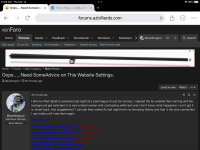
Look at the very, very bottom of your screen (below Home/Forums/etc), and then on the left. It may say something like "XF2 Default Dark". Whatever it says, click on it, that is the darkness settings for the forum and there are five of them. Try them out and see which meets your preference. I believe the brightest one with the white background, which is probably what you previously had, is "Default style new".
 
Thank you very much……followed your instructions which was easy to understand…..selected default and everything is back to normal again……I appreciate your expertise and willingness to assist me.

Matt B.
 
Haha, I hadn't noticed "Default style slightly grayer" before, that name cracks me up.

I'm a "Shades of grey" fan myself.

The inconsistency in the spelling of gray/grey bugs me though.
 
Been looking for the "your account > preferences" screen. All I get under "home" is news.
At the very top right of your screen, beside your messages and alerts and search icons, click on your screen name. That will bring up a number of things you can access including your forum preferences.
 
Thank you very much……followed your instructions which was easy to understand…..selected default and everything is back to normal again……I appreciate your expertise and willingness to assist me.

Matt B.
Now you have to give him a killer deal on a Szamboti!
 
Back
Top