Bobcad?

Cue

AzB Silver Member
Silver Member
I just got a used Cuemonster and would like to upgrade over the Bobcad version 17 it came with. I am new to CNC so I don't know how to draw designs other than the great tutorial posted here by Tony and the DVD I bought from Unique.
I am very familiar with computers though so that should help in the learning process.

I see on Uniques site they sell a instructional DVD for version 21 and I was thinking about buying that and maybe version 21 to go along with it. Bobcad Version 23 or 24 seems priced pretty high unless someone has a deal? ;)

Does anyone know if the video they sell on version 21 would apply well to a newer version? I don't know how much difference there is between 21 and 23 or 24.
I cant decide if I should buy 21 or wait to find a deal on 23 or 24?
 
If you are familiar with computers, then why would you consider using software that is at least two major revs behind, and out of support? Get at least v23, if not 24, or try one of the free packages.
 
Last edited:
Being familiar with computers means you don't want the latest and greatest usually till the bugs are worked out. ;) :D

But the main reason why is that it is cheaper and I can get a Instructional video from Unique on that version which might make it easier to learn overall.

If you are familiar with computers, then why would you consider using software that is at least two major revs behind, and out of support? Get at least v23, if not 24, or try one of the free packages.
 
I would really recommend taking one of the Bobcad courses when they are in your area. three days of training by a professional will be a great help.
 
Bobcad

Bobcad should have a forum if you post your question there.
if they are like cambam, mach3, or aspire, there are ppl in each group that will help you.
Bobcad has trial versions you can download for free .
which cam software are u going to use with Bodcad.
none of these programs are (plug and play). jumping into 4 axis cnc!
3 axis is kicking my butt .............................................................
some free trial software has limits mach3 for example is 40 logins and 500 lines of g and m codes.
everyone is going to tell you that you should already know Bobcad mach3 software before you bought your cue monster.
so you might be in for some humble moments.
if you buy mack3 with addons it has diamomd shape and other wizards
plus it will give you a little insight in Bobcad in knowing what you need to tell your cue monster what to do.
buy up to date software
ps mach 3 works the best with windows xp and is best that the Desk top PC is used only with and for cam cad systems your cnc.
(Lap top pc will not work with a cnc )
good luck mike
 
I am using the laptop that comes with the Cuemonster and that has Bobcad 17 and DeskNC on it. I have cut a few shapes from the disk that came with it, and another member here that sent me some files as well, the cutting part is easy, its the drawing part that is more difficult :)

I have drawn up a diamond in the trial of Bobcad 24, but was wondering if 21 was similar or not. Version 17 is a lot of extra steps compared to the newer versions from what I can tell.
I will be updating to Mach 3 as well and building a dedicated computer for it from some spare parts I have laying around.

Anyone have a good deal on V23? Is version 21 and 23 similar?
 
V21 is nothing like V17 and V23 is nothing like V21. 23 & 24 are very similar. If you're planning on upgrading in the future, then you might as well get 23 or 24 now or you're going to have to learn things twice.

Mach3 runs fine under Windows 7, just not in 64 bit. I know people that run Mach3 on a laptop without any issues. The printer port on Laptops supposedly doesn't put out as much power as you need, but there are some pretty well known cue makers that use them with no issues.

I wouldn't waste money on Add ons for Mach3. You don't need them. If you can't draw a diamond, then you're not going to get very far anyway.

Your problem is going to be that if you are using a Cue Monster, you're going to have to talk to somebody that has gotten theirs working under Mach3 without paying a lot of extra money for the upgrade that they offer. Your best bet might be to buy a Gecko Controller and new motors and then it will be easy to get it working with Mach3. Perhaps the old motors will work fine with the Gecko, but you might have to do some re-wiring. I really don't know how the cue monster is set up.

I have 4 Xyloteck motors I'm willing to sell, but I don't have the controller. You might be able to pick one up used from somebody on here or on Ebay though.
 
Thanks for the info. I was talking with Unique and they told me it will work fine with Mach and they would send the post processor as well, so it should work fine with this machine.
I dont think the upgrade to Mach 3 is as important as the Bobcad, right now anyway? I was told that I could still use the Desknc to cut with after drawing them up in Bobcad.

I think I will look for V23. Have you used 21? If I bought the $79 training DVD Unique sells for V21 would that apply enough to walk me thru it using V23?

I like your walkthru you posted and I think that is what the training video they sell shows, which would be a great help.
 
Last edited:
Thanks for the info. I was talking with Unique and they told me it will work fine with Mach and they would send the post processor as well, so it should work fine with this machine.
I dont think the upgrade to Mach 3 is as important as the Bobcad, right now anyway? I was told that I could still use the Desknc to cut with after drawing them up in Bobcad.

I think I will look for V23. Have you used 21? If I bought the $79 training DVD Unique sells for V21 would that apply enough to walk me thru it using V23?

I like your walkthru you posted and I think that is what the training video they sell shows, which would be a great help.

Its not the post processor that you have to worry about.. You can down load that straight from Bob-Cad's site.. The problem will be reconfiguring the machine to run in Mach3. I would ask them if they have any profiles for mach3that they have setup for their old gecko and their 429 oz motors and the 1/2-10 Kerk lead screw. Then you will have to go through and setup backlash compensation as well.
 
Bobcad

yes you can use a lap top with Bobcad .
my system a desk top pc windows xp cam bam mach3 mach3 addons photo carve,software i want to get aspire but it is spendy.
i would buy latest versions of Bodcad every update they make it more user friendly

mike


i
 
It is pretty well documented how to run Mach3 on a laptop. You have to replace the ACPI drivers in Control Panel/System Devices/System with Standard PC drivers. They are all built into Windows.

I haven't tried Mach3 on a Windows7 32 bit machine yet, but I will.

FYI

Gary
 
bump

* Desktop PC (if using the Mach3 Parallel Port Driver - laptops are not supported because the power saving features of the chipsets disrupt the pulse stream, PCMCIA and USB parallel adaptors will *not* work.)"

An external card is mandatory with a laptop.
 
Last edited:
Thanks for the info. I was talking with Unique and they told me it will work fine with Mach and they would send the post processor as well, so it should work fine with this machine.
I dont think the upgrade to Mach 3 is as important as the Bobcad, right now anyway? I was told that I could still use the Desknc to cut with after drawing them up in Bobcad.

I think I will look for V23. Have you used 21? If I bought the $79 training DVD Unique sells for V21 would that apply enough to walk me thru it using V23?

I like your walkthru you posted and I think that is what the training video they sell shows, which would be a great help.

Hi,

I took the 3 day BobCad training seminar when they came to Chicago. It is worth the money. Even with that said, be prepared to spend hundreds of hours practicing because it is going to take a lot of time to feel comfortable.

BTW, each new version of Bob Cad clears bugs from the previous version. There are bugs in Bob Cad but for the money it cost it is a great tool for CMs. However, once you verify a geometry, test the pocket/profile cutter comp and push the inlay into the pocket proving that your G-Code is on time with your expectation, you are good to go. It will be repeatable every time once it is in Code.

BTW Mr. Hoppe has 2 degrees in computer science, when he offers an opinion, you can take it as gospel. He's a pro. BTW forget about BC 17. 23 or 24 will be your best bet as Tony has suggested.

If you buy BobCad, you will need the nesting feature for you inlay geometry, it is efficient and will save time.

We bought our Mach 3 for $ 150.00 and it works fine with the Cue Monster bought in 2006.

Good Luck,

Rick G

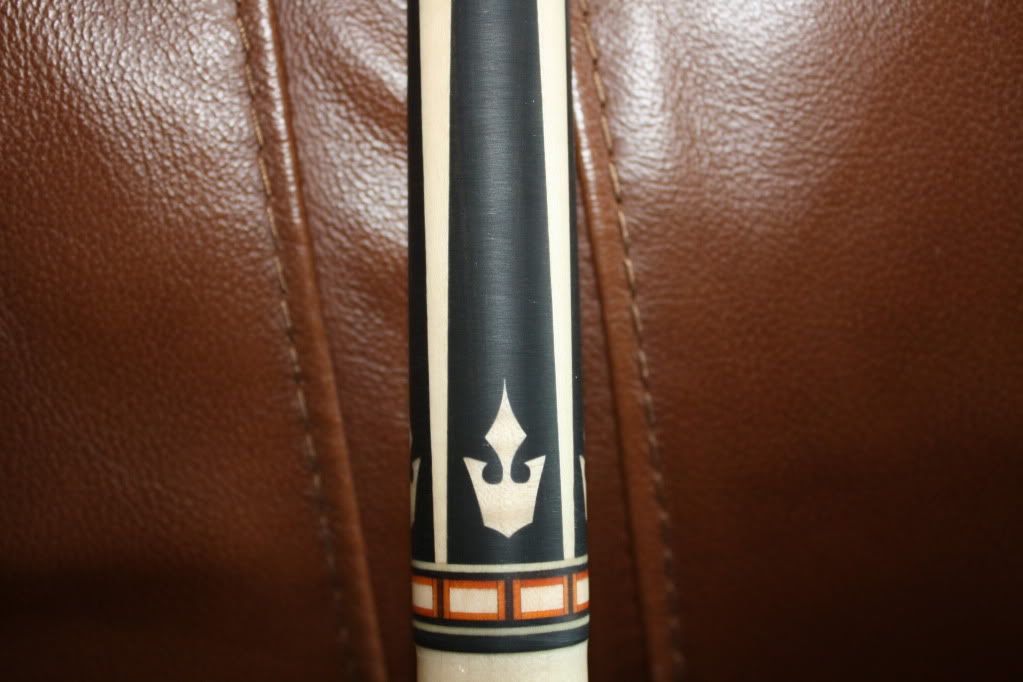
Here is cue prep sanded for clear coat with copywritten artistic inlay design features created by Mr. Hoppe on Bob Cad Cam V 23. We bought a licensed copy of the Mach 3 program for $ 150.00 with no upgrades. The Inlays and pockets were cut on a Cue Monster with their standard controller and steppers using Unique's Quiet Spindle not a router set up.
IMG_3570.jpg

IMG_3571.jpg
 
Last edited:
BTW, I find new bugs in v23 about every other time that I use it. It is functional, but FAR from perfect. Frankly, I don't know how a professional software company can put out a product with SO many bugs. I'm starting to wonder if v24 is worth the price to upgrade.
 
I am now using V21 and have it working fine on my Cuemonster with Mach 3. The pockets and parts I have drawn, (thanks for the help Joe :smile:) turned out fitting great but they need a little help with an xacto as the last pass of the cutter is lifting out gradually before it actually reaches the end of the part and coming straight up. That leaves a little ramp of material that I have to remove with the xacto knife from the part and the pocket. Anyone know why I am getting this ramp?
 
Hi,

I took the 3 day BobCad training seminar when they came to Chicago. It is worth the money. Even with that said, be prepared to spend hundreds of hours practicing because it is going to take a lot of time to feel comfortable.

BTW, each new version of Bob Cad clears bugs from the previous version. There are bugs in Bob Cad but for the money it cost it is a great tool for CMs. However, once you verify a geometry, test the pocket/profile cutter comp and push the inlay into the pocket proving that your G-Code is on time with your expectation, you are good to go. It will be repeatable every time once it is in Code.

BTW Mr. Hoppe has 2 degrees in computer science, when he offers an opinion, you can take it as gospel. He's a pro. BTW forget about BC 17. 23 or 24 will be your best bet as Tony has suggested.

If you buy BobCad, you will need the nesting feature for you inlay geometry, it is efficient and will save time.

We bought our Mach 3 for $ 150.00 and it works fine with the Cue Monster bought in 2006.

Good Luck,

Rick G

Here is cue prep sanded for clear coat with copywritten artistic inlay design features created by Mr. Hoppe on Bob Cad Cam V 23. We bought a licensed copy of the Mach 3 program for $ 150.00 with no upgrades. The Inlays and pockets were cut on a Cue Monster with their standard controller and steppers using Unique's Quiet Spindle not a router set up.
IMG_3570.jpg

IMG_3571.jpg

I like the rook type image!
 
I am now using V21 and have it working fine on my Cuemonster with Mach 3. The pockets and parts I have drawn, (thanks for the help Joe :smile:) turned out fitting great but they need a little help with an xacto as the last pass of the cutter is lifting out gradually before it actually reaches the end of the part and coming straight up. That leaves a little ramp of material that I have to remove with the xacto knife from the part and the pocket. Anyone know why I am getting this ramp?

You must have a ramped leadout. Try a circular leadout combined with a little overlap. Pay close attention to your lead in/out tool path though to ensure that you're not circling in/out and cutting something that you don't intend to cut.

I like the rook type image!
The geometry was not based upon a rook or any other chess piece, but thank you for the compliment. It's pretty difficult coming up with unique shapes that look good and are suitable for use in a pool cue...
 
Last edited:
Hi,

Mr. H is very persnickety about his geometry being perfect. He re tweaked this design 9 times and verified tested the G-Code to pocket/parts with multiple cutter compensation extrapolations.

A patient man who reaches for the highest apple on the tree.

Rick G

Pay no attention to that man behind the curtain Scarecrow.:rotflmao1:

Mr. H practicing his love of the game!!
IMG_3545.jpg
 
Last edited:
You must have a ramped leadout. Try a circular leadout combined with a little overlap. Pay close attention to your lead in/out tool path though to ensure that you're not circling in/out and cutting something that you don't intend to cut.

Thanks for the info, im not sure how to do that though. I found a menu that says approach and depart and tried changing the values in there but it didnt seem to have an effect so I must be doing something wrong.
 
Thanks for the info, im not sure how to do that though. I found a menu that says approach and depart and tried changing the values in there but it didnt seem to have an effect so I must be doing something wrong.

Cue,

It is in the edit mode for 2 axis milling "profile" geometry in the cam tree. Click the circular lead in/out. Like Mr. H said, you have to make sure you are not interfering with other parts if nesting.

Rick
 
Last edited:
Back
Top