Adding new features to the forums

OK, I got rid of the code that was showing the number of users in chat. That is allowing me to get into the forums with Firefox now.

I am going to see if Iacas can do anything with the funky menu problem.

Mike
 
AzHousePro said:
OK, I got rid of the code that was showing the number of users in chat. That is allowing me to get into the forums with Firefox now.

I am going to see if Iacan can do anything with the funky menu problem.

Mike

You still cant get into the chatroom though can you?

Keep in mind, it isnt solely a firefox problem as i have said before-On my laptop FF works fine with Java pages. It is the same version so 'this FF' must be 'clashing' with something else on my PC that then screws up the Java Page?

If anyone has any ideas, please post them.
 
Last edited:
ScottW said:
The chat program is a Java app - might I suggest you folks head over to www.sun.com and pick up the latest JRE (Java Run-time Environment) for your computer/operating system. Try the chat again after you've got the latest and greatest installed.

Thanks - I loaded the Java program and I'm up and running.
 
I'm also using a Firefox browser.

I do have the following comments:
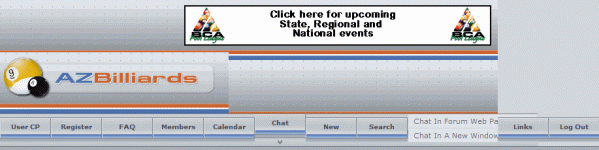
There's a tab that's called "New" that should be re-labeled to something more descriptive. Also, on my screen "Links" appears to be super-imposed upon a tab called "Chat In Forum". "Log Out" appears to be super-imposed upon a tab called "Web Page".
 
After the chat feature was added, I have been seeing this problem:

azb.gif

Is it just me? Haven't tried much to fix it. Just refreshed the page. I'm running IE7.

(Edit: also tried restarting my browser, but no luck.)
 
Last edited:
Cuebacca said:
Is it just me? Haven't tried much to fix it. Just refreshed the page. I'm running IE7.

(Edit: also tried restarting my browser, but no luck.)

IE7? Is it in Beta or available through Windows Update? I didn't even realize they were up to 7.

Thanks,
Koop
 
Cuebacca said:
After the chat feature was added, I have been seeing this problem:

View attachment 23748

Is it just me? Haven't tried much to fix it. Just refreshed the page. I'm running IE7.

(Edit: also tried restarting my browser, but no luck.)


I've got the same thing with IE 6
 
From what it looks like to me, it only messes with the look of the page if you're using the "new" skin (actually several months old now). Also, it appears to have problems with users who have a space in their nickname. In my case, I can't log in. It keeps trying to log "Jimmy" in (dropping off the "<space>M.") and, when "Jimmy" + <my password> fails, it prompts me for a valid password. Of course, since "Jimmy" isn't my username, it fails every time that I enter my password. This is just a guess at what the problem is based on the behavior, but I asked another user here who doesn't have a space in their name to log in and try it and it works fine. In both of our cases, using the new skin, the main page looks a bit mangled.
 
chatrooms

well ok go ahead and put in the new chatroom do you have any idea how many people who go to those chatrooms are not what they seem to be or who they might be so just leave me out of this ok :)

thanks
 
Cuebacca said:
After the chat feature was added, I have been seeing this problem:

View attachment 23748

Is it just me? Haven't tried much to fix it. Just refreshed the page. I'm running IE7.

(Edit: also tried restarting my browser, but no luck.)

I'm seeing that little double-down arrow as well.

Looking at the source, I find this bit of code right after the button:
vbmenu_register("chat");

whereas I also find this bit of code after the "Search" button:
vbmenu_register("navbar_search", 1);

Note the extra ", 1" in there - I'm guessing the vbmenu_register() function is looking for that extra variable by default.

Also, the <script> tags are tucked right after the </a> tags on the older buttons, whereas on the Chat button, there's a line-feed and a couple of tabs. That might be causing the display issue as well.
 
ScottW said:
I'm seeing that little double-down arrow as well.

Looking at the source, I find this bit of code right after the button:
vbmenu_register("chat");

whereas I also find this bit of code after the "Search" button:
vbmenu_register("navbar_search", 1);

Note the extra ", 1" in there - I'm guessing the vbmenu_register() function is looking for that extra variable by default.

Also, the <script> tags are tucked right after the </a> tags on the older buttons, whereas on the Chat button, there's a line-feed and a couple of tabs. That might be causing the display issue as well.


I think you hit the nail on the head.

If i get some time I'll write a few lines of code and straighten this out.
 
Do you have to register or something??....It won't accept my password....
________
 
Last edited:
Craig Fales said:
Do you have to register or something??....It won't accept my password....

It should work for you now. There was a problem for those of us who have spaces in our usernames.
 
There were two options for bringing up the forums. I killed one of them and just made the 'chat' link go to the full screen chat. That took care of the menu problems we were having.

Mike

Nostroke said:
I think you hit the nail on the head.

If i get some time I'll write a few lines of code and straighten this out.
 
Back
Top