So where does STROKE POWER come from?

Colin:

I mounted a couple of accelerometers to the butt end of my cue, and fed the outputs to a laptop pc. This let me check the straightness of my stroke, as well as my stroke timing.

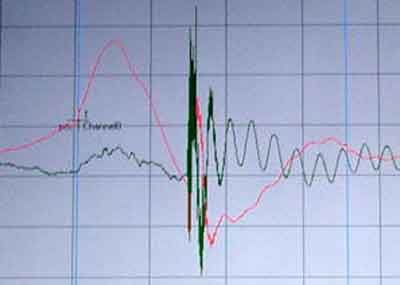
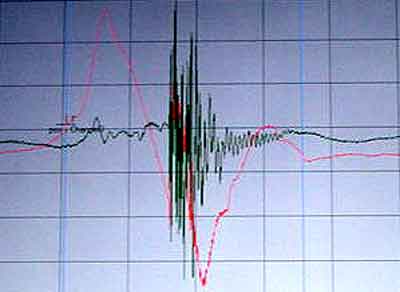
In the screen shots below, the red trace shows the stroke acceleration, while the green trace shows side to side movement.

For reference, zero "g" is an imaginary horizontal line through the middle of the display.

Ideally, the tip should strike the cue ball at maximum velocity. By definition, the acceleration would be zero, since the speed is neither increasing or decreasing.

The entire forward stroke takes only about a third of a second. In the screen shots, the contact point is near the center of the display, and can be identified by the high frequency noise on the green trace.

The screen shot labeled "good stroke" shows that I had a straight stroke, but I hit the cue ball late, since the contact point is after the red trace goes below the zero g reference line, so my stick was slowing down.

The screen shot labeled "bad stroke" shows I swerved the cue, but hit the ball closer to the right time. The oscillations on the green trace after the hit mean that the shaft is vibrating side to side, caused by an off center hit.

Note that the time difference is about 50 milliseconds. Not much, but it could be the difference between a crisp hit and a mushy one.

I haven't used the setup enough to see if I can train myself to hit the ball at the correct time. Stroking straight is always a challenge.

"Good Stroke"
goodstroke.jpg


"Bad Stroke"
badstroke.jpg
 
Last edited:
9BallBust-O said:
I get the whole stroke idea. I keep my arm very still only elbow moves, keep my body inline with the shot, im down on it , loose grip , follow through , stay down.
Here is the part I cant figure out and I guess it kind of relates to the Allison/Jasmine thread - where does the power for the stroke come from. Example .. I can line up a shot and hit it as hard as I would a break but the cue ball will not react the correct way. I can line up a draw shot from one end of the long rail to the other end and draw back to the top again but thats about it. Hitting the ball harder does nothing so how do I get some more power?

I would say to exemplify what your looking for, get a tape of Bustamante playing his best, can't think of another player hitting through the ball much better than he.
 
JohnnyP said:
I mounted a couple of accelerometers to the butt end of my cue, and fed the outputs to a laptop pc. This let me check the straightness of my stroke, as well as my stroke timing.

The entire forward stroke takes only about a third of a second. In the screen shots, the contact point is near the center of the display, and can be identified by the high frequency noise on the green trace.

The screen shot labeled "good stroke" shows that I had a straight stroke, but I hit the cue ball late, since the contact point is after the red trace goes below the zero g reference line, so my stick was slowing down.

The screen shot labeled "bad stroke" shows I swerved the cue, but hit the ball closer to the right time. The oscillations on the green trace after the hit mean that the shaft is vibrating side to side, caused by an off center hit.

Note that the time difference is about 50 milliseconds. Not much, but it could be the difference between a crisp hit and a mushy one.

Now that is unspeakably cool (at least to a nerd like me). Are the accelerometers and laptop interface/software affordable and/or easy to set up? My guess is they're at least very expensive.

I would think that could be a really powerful self-teaching tool for honing your stroke motion. It would be really great to, for instance, compare my stroke data with Corey Deuel's or some other pro known for their power stroke, and identify the key characteristics that make his stroke yield better results. Then I could spend hours with the laptop hitting shots and teaching myself to make those same characteristics show up in the trace.

Seems like a great way to separate the relevant kinematic characteristics from the "mumbo-jumbo" you hear from many pool enthusiasts.

-Andrew
 
Agree Manning - would love to see a number of pros results for different shots.
I think that Jonny P said something that may be my problem.
Lets use a break as an example .. pretend to hold your cue hand 4-6 inches further up the cue towards the shaft and break!! The cue will get no power ... I think I may be hitting the cue ball too late .. after the force is slowing down and that could be causing the heavy cue ball.
 
Yeah, that's great Johnny P,
I'm also interesting in getting one of these accellerometer set ups if the price is not too high.

It seems even more effective than a laser in tracking sideways movement.

It would be really cool to have those on pro-player's cues during a match for quick analysis of swiping or swooping.

btw: I would think that the cue should still be accellerating slightly when it reaches the CB. Afterall, if we threw the cue underhand, we would continue the accelleration past this point.

The reason we don't lengthen our bridges further to increase power would be the lack of control that it causes, rather than the the cue decellerating beyond 15 or so inches of swing. Just a thought.

Colin
 
My prototype has a 10' phone cord dangling off the back end of the cue. It's ok if you want to stand in one place and practice straight in shots, but I'd really like to make it wireless.

For development, I used a laptop and a $1k data collection system. Too cumbersome and exensive to drag around, but when I saw the data, I knew others would want something like it.

I searched for a low cost display, and found a guy in Switzerland that made an interface for the Gameboy. Shazam! Gameboys are down to about $70, and his module was about $50. I got mine, but, sadly, he couldn't sell enough of them to stay in business.
 
JohnnyP said:
My prototype has a 10' phone cord dangling off the back end of the cue. It's ok if you want to stand in one place and practice straight in shots, but I'd really like to make it wireless.

For development, I used a laptop and a $1k data collection system. Too cumbersome and exensive to drag around, but when I saw the data, I knew others would want something like it.

I searched for a low cost display, and found a guy in Switzerland that made an interface for the Gameboy. Shazam! Gameboys are down to about $70, and his module was about $50. I got mine, but, sadly, he couldn't sell enough of them to stay in business.
Did you have to do any specific programming Johnny or do the accellerometers come with suitable software?

Why not just use a laptop as a display screen?

Colin
 
While there have been some interesting suggestions in the previous posts there is one that has not been mentioned and may contribute to part of the problem.

I suggest you have a competent instructor check your tip, its shape and the chalk you are using. If you are miscueing due to a poor tip, you may be trying to correct this by cueing to high to get enough cue ball action.
 
Back
Top