Computer tech section for the forums?

JoeyA said:
I had to read a few posts now I get it.

You guys just want to thumb your noses at the Physics guys. :D :D :D

JoeyA

Never! Who are we going to call when we need to lob an apple? :p
 
I would appreciate such a forum. I don't know squat about puters and could use help sometimes, like in reducing pics etc.
 
seymore15074 said:
No, they cannot see anything on your computer. Feel free to store lots of child porn. :D

I have some confidential files that I wouldn't want anyone to see, which is why I was worried. I should burn them onto a CD and take them off my computer, but I haven't figured out how to burn a CD/DVD yet on my Dell XPS 410. :o

seymore15074 said:
In order to connect to them, you use a client FTP application and in order for them to accept your connection they have an FTP server already running. Without the server, you could not connect to them. So, that means that as long as you are not running an FTP server, then they cannot connect to you with their FTP client.

Remote assistance, Remote access, and file/printer sharing settings are in the control panel under the windows firewall, I think. If you turn them all off, you'll be the safest; but generally you're good as is...I don't have mine off.

That makes sense to me. Thanks so much.

I am going to get my own FTP server within the next month. I have to in order to keep up with my industry. It's a cost of doing business, I guess.

BTW, I just ordered a new Dell Inspiron 1501 notebook. It was the only notebook I could find that I could get Windows XP operating system. I know I could have loaded Windows XP myself on another notebook, but as you can tell, I am technologically handicapped. So I'd rather have it all loaded up.

My brother just bought a Sony notebook with Vista. So far, he likes it okay, but I have existing software that I must use for my work, and others in my industry said Vista was a nightmare as far as compatibility.

Thanks again for your help! :)

JAM
 
Reducing pics.. lots of good ways to do that.
Buying a laptop, dealing with Vista..

Man, just reading the last few posts tells me this group could really benefit from a PC section on the forum.

As for reducing pics...
When you double-click on the image from your windows explorer, it probably comes up in windows picture viewer.. right click on it and select 'edit', or do the same from within windows explorer.
Edit should bring up the image in MS Paint..
If it doesn't, just find MS paint in your accessories list under the start menu, open it, then open the pic you want to resize.

At this point, you should be viewing the pic in MS Paint. Click the dropdown menu labeled 'image' at the top.. then click 'stretch..skew'
You should now see a little window with numbers next to 'horozontal' and 'vertical'.. both should say 100%.. change them both to 25%, or 20%, etc.. then save the file.. whalla!

Note: if the reduced size is not small enough, 'undo' it back to 100% and select a new number.. reducing a reduced image causes additional loss in quality, so always start at 100% and go right down to the size you need. I find for image posting (like pics of a cue on the board), 20% is generally perfect.. but I start with 10megapixel images so that may not be the ideal number for you.
 
Also, there are numerous programs that will reduce large amounts of images at once.. I use Adobe Lightroom, an absolutely amazing piece of software if you do a lot with digital photography.. one of few softwares I've ever paid money for lol.
 
JAM said:
I have some confidential files that I wouldn't want anyone to see, which is why I was worried. I should burn them onto a CD and take them off my computer, but I haven't figured out how to burn a CD/DVD yet on my Dell XPS 410. :o

I guess I'll take the burn a CD one... :p In Windows XP, CD burning is integrated. You can insert an empty CD and it may prompt "what do you want to do...". Just open the empty folder. If there was no prompt, hit the WIN key and hold it down while you press E. Win-E will open the Windows Explorer, and you should then double-click on the CD drive pictured.

At that point, you can copy or move files from any other folder on your computer into that one. Once you are ready to burn the CD, right-click on the background in the empty space of that window and select create CD (or something similar, I can't remember how it is worded).
 
seymore15074 said:
I guess I'll take the burn a CD one... :p In Windows XP, CD burning is integrated. You can insert an empty CD and it may prompt "what do you want to do...". Just open the empty folder. If there was no prompt, hit the WIN key and hold it down while you press E. Win-E will open the Windows Explorer, and you should then double-click on the CD drive pictured.

At that point, you can copy or move files from any other folder on your computer into that one. Once you are ready to burn the CD, right-click on the background in the empty space of that window and select create CD (or something similar, I can't remember how it is worded).

Thanks so much. I just printed this reply and put it on my bulletin board by my desk.

I did a transcript for a Federal Government entity recently, and they requested a Word-formatted file on a CD. I had always dealt with 3.5 floppies and had no idea how to burn one.

I had a CD here with a bunch of pictures on it that was given to me by a billiard media person, which I had already copied on my hard drive. I tried and tried to delete, erase, chop, cut, and did everything possible to get those photos off the CD, but to no avail. If I could have figured out how to get those photos off the CD, I would have used that CD to copy the file to for the client. Then again, I may not have been able to figure that out either.

I ended up sending the client a 3.5 floppy with her file. She was okay with it, but I will never do it again. My daughter, if she was home, could have done it for me, but she works and goes to school full time.

I agree that it would be cool to have a little computer sub-forum. Last time I suggested a hypothetical forum, though, the thread ended up not being received very well. I won't ever make that mistake again. :(

JAM
 
Thanks for taking that one! I upgraded to Vista and had 0 problems with compatibility.. but I have heard that some had troubles. It's also difficult to run it if you have less than 2 gigs of RAM, which is the case for many folks.

I've also been receiving PC questions via PM since this thread started.. I think it would be better if all of us had a crack at the issues, so the ideal solution could be found. We all have something to learn! That windows-key E thing was new to me! I'd never even used the windows key lol. That's really what my thinking was behind having a section created specifically for this stuff. The posts here, and the PMs suggest that a lot of folks have questions they don't want to post simply for lack of an appropriate area for it.
 
Bastian said:
...The posts here, and the PMs suggest that a lot of folks have questions they don't want to post simply for lack of an appropriate area for it.

Or, in the alternative, some posters may feel a little embarassed or intimidated to ask questions about things which seem so simple.

I think I am safe in saying that there are MANY who fall in the category that I am, which is TECHNOLOGICALLY HANDICAPPED! :D

JAM
 
JAM said:
Is there a way to make a website look good in ALL browsers?

I was hoping there may be a compatible way to do it. :)

JAM

Try enclosing the pharagraph inside a table, and tweak the WIDTH value;

<TABLE CELLSPACING="0" CELLPADDING="2" WIDTH="200px">
<TR>
<TD>
/// ---- Existing paragraph here including HTML codes ----- ///
</TD>
</TR>
</TABLE>
 
JAM said:
Or, in the alternative, some posters may feel a little embarassed or intimidated to ask questions about things which seem so simple.

I think I am safe in saying that there are MANY who fall in the category that I am, which is TECHNOLOGICALLY HANDICAPPED! :D

JAM

I think that's the case for all of us, to some degree.. I've been using PCs daily for 2 decades yet still my 10 year old taught me something new last weekend.. This thread taught me something new 15 mins ago (thanks for the windows key trick!) we all have our 'niche' in things, but PCs are just such a vast land of unknowns that communities who play well together (like AZB) could really help one another immensely.
 
crosseyedjoe said:
Try enclosing the pharagraph inside a table, and tweak the WIDTH value;

<TABLE CELLSPACING="0" CELLPADDING="2" WIDTH="200px">
<TR>
<TD>
/// ---- Existing paragraph here including HTML codes ----- ///
</TD>
</TR>
</TABLE>

That's a great idea, myspace uses the heck out of tables on their site--possibly for the very same reason of fixing consistant widths... Post if it works or not!
 
Bastian said:
Man, just reading the last few posts tells me this group could really benefit from a PC section on the forum.

Yeah, and read geeks banter about who is geekier using words that you can only find in Dungeons and Dragons' manual. :D
 
crosseyedjoe said:
Try enclosing the pharagraph inside a table, and tweak the WIDTH value;

<TABLE CELLSPACING="0" CELLPADDING="2" WIDTH="200px">
<TR>
<TD>
/// ---- Existing paragraph here including HTML codes ----- ///
</TD>
</TR>
</TABLE>

YIPPEEEEEEE!

The columns are now perfect, in IE and Firefox. WOW! Ask and you shall receive! Thanks, Crosseyedjoe! :)

Thanks to all of you computer guru guys. You're the best! :p

JAM
 
Question which has REALLY bothered me the last 10 years or so:

When I turn my computer on, the screen is blue, with white text saying "Ready". Then I press "FW" on the grey box next to it, and it makes some weird sound and some numbers are moving (counting up). When it is between 99 and 100 I press the button "Stop", then "Play".

Sometimes the screen goes crazy in all kind of colours, pretty cool actually, and then the game starts.

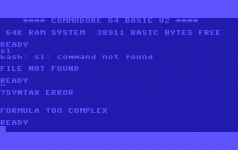
But sometimes I get the text "Syntax Error" on the screen, like the picture attached. Why? Is it because I stopped the numbercount at 99 1/4 instead of exactly at 99??

I have also tried to type "connect to www.azbilliards.com" after it says "Ready", but no reaction. I think I might need a special Compact Cassette, but I haven't found it yet. Any idea where to get it? I prefer using that computer instead of my laptop, so would be great to get azb on it too, and not just "Giana Sisters"
 

Attachments

  • Syntax Error.png
    Syntax Error.png
    3.7 KB · Views: 202
Last edited:
Back
Top