CAD software

hangemhigh

Known Sinner
Silver Member
What is the most versatile and affordable CAD? I am getting ready to dump my 20 year old Master-cam, and move into the 21st. century design software. Opinions and resources please.

 
I use AutoCAD 2008, but most of the drawigns we produce are electrical shop drawings. PM sent...
 
What is the most versatile and affordable CAD? I am getting ready to dump my 20 year old Master-cam, and move into the 21st. century design software. Opinions and resources please.

Sounds like an oxymoron, most versatile and affordable used in one sentence. It's just my opinion but as Master Cam has always been at the top of the heap as far as software goes and some of the top CNC cue makers including Thomas Wayne swears by it I would try to upgrade the present system. Learning the many, many short-cuts that Master Cam affords is the draw back of the system. If the time investment has been committed to learn the ins and outs of Master Cam already then I would certainly try to find a way to keep the system.
Like I said, just my opinion.

Dick
 
I think BobCad is one of the more affordable options at $400-$500. As far as versatility, it seems to be able to do about anything that you could want to do, to a cue anyway. Just know that you WILL be hounded by their sales people . . . for life.
Mr H
 
What is the most versatile and affordable CAD? I am getting ready to dump my 20 year old Master-cam, and move into the 21st. century design software. Opinions and resources please.

We use EnRoute 3. I guess the only reason we use it is because it came with the machine. :) They are up to EnRoute 4 but I'm still using the old version.

I don't know of any other cuemakers using it but it works great for us. It was so easy to learn. I've used autocad a bit in high school. I gave it a shot recently and couldn't figure out how to draw a circle... HAHA... Ok, it wasn't that bad but it was close.

EnRoute is easy and setup to do inlay work from the start. You can draw a part and with 4 clicks have the tool paths created. Parts too tight? Just increase the "Inlay Gap" a couple thousands. So sickeningly simple.

It has it's drawbacks. The nesting functions suck. They are completely unusable for cuemaking. I have to nest all of my parts sheets by hand. It also has a few bugs which you have to learn to work around and deal with. They are minor but a bit annoying none the less.

Version 4 is out, I am told the issues have been resolved. I haven't used it. I don't know.

matta
 
Is Mastercam considered a CAD software?
I'm learning Autocad Inventor 2010.
It doesn't generate G-codes but importing the drawings on Mach 3 will.
The great thing about Inventor or Solidworks is you can do solid modelling in them.
So, instead of wasting material, wood or time, you can assemble components in there and see if they fit/work.
I'm just scratching the surface right now.
Mastercam is coming out with Solidworks integrated in it too.
I dunno if we can afford that.
 

Attachments

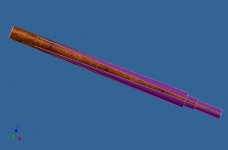
  • groovedforearm14.75lside.jpg
    groovedforearm14.75lside.jpg
    75.3 KB · Views: 276
Last edited:
Bob cad 21.5
and mach 3

199.00 for bobcad
170.00 for mach 3

with these 2 you can do anything in cue making

no need to spend any more or get any super advanced hard to learn software
 
If you are already good with a version of Mastercam, I'd stay with it and upgrade to another level. I use Mastercam 9 and I really like it. Almost anything is possible along with the 4th axis machining. I can't live without it. I use it in conjunction with MachIII which I also like alot. Makes life easier.
I also use a raster to vector program from Algolab to import designs as jif, tif, bmp,......... and so on. Then create a vector from the raster and save as a .dxf file which can be imported into Mastercam and g codes generated from the drawing. Powerful!!
 
Bob cad 21.5
and mach 3

199.00 for bobcad
170.00 for mach 3

with these 2 you can do anything in cue making

no need to spend any more or get any super advanced hard to learn software

how you getting bobacd 21.5 for $199 the best I can get it for is $299.
So what is your secret???
 
call them on friday afternoon the best time to buy

imissed the part he was using mastercam before but price wise you cant beat bobcad
 
how you getting bobacd 21.5 for $199 the best I can get it for is $299.
So what is your secret???

Just act like you don't need it. I had them at $199 for Ver 23. If you make them keep calling you back and pretend you don't care if you upgrade or not, they may end up paying you to take one.
 
Just act like you don't need it. I had them at $199 for Ver 23. If you make them keep calling you back and pretend you don't care if you upgrade or not, they may end up paying you to take one.

At that price, I don't think you're getting BobArt, which is useful for raster to vector manipulation and other fun stuff. I don't think you should bother with an older version if you go this route. Go straight to v23, which is the current version.
Mr H
 
At that price, I don't think you're getting BobArt, which is useful for raster to vector manipulation and other fun stuff. I don't think you should bother with an older version if you go this route. Go straight to v23, which is the current version.
Mr H

Yes, it comes with BobArt, however, I find BobArt useless. I doubt you'd get that price as a new user. They gave it as an upgrade after I told them 100 times I don't need to upgrade.
 
Is Mastercam considered a CAD software?
I'm learning Autocad Inventor 2010.
It doesn't generate G-codes but importing the drawings on Mach 3 will.
The great thing about Inventor or Solidworks is you can do solid modelling in them.
So, instead of wasting material, wood or time, you can assemble components in there and see if they fit/work.
I'm just scratching the surface right now.
Mastercam is coming out with Solidworks integrated in it too.
I dunno if we can afford that.

That's the rub with Master-cam for me, 5 digit pricing. I'm not looking for a 6 axis application, just the essentials.

Anyone use or know about Turbo-cad?
 
> GibbsCAM is awful good,but also pricey. The other thing is you have to have a "post" file for your particular machine,if you buy the full version of the program you get a "post" for one lathe and one mill. These usually will have to be written for your machine,unless you have something common to them such as Haas,Fadal,etc,in which case the posts are easy to come by. The drawing interface is fairly easy to learn as far as the basics,but takes some getting used to if you're coming from a AutoCAD background.

It's been my understanding that MasterCAM is a CAM program,as opposed to CAD. That's a hell of an expensive program. Tommy D.
 
IMSI TurboCAD

Anyone use or know about Turbo-cad?

Tommy, IMSI's TurboCAD?
Yes, $89.00 with Training package from Amazon..
(Training package was about $60.00 alone..)
Still learning, using "trail and error" method..
Shapes saved in DXF don't always up-load/transfer correctly
to LazyCAM..
I didn't get the Training Package..
 
Last edited:
Back
Top