CNC Root Cause, Corrective Actions & Lessons Learned

scdiveteam

Rick Geschrey
Silver Member
Hi,

Over the last 3 weeks I have been building my first big CNC cue with 151 inlays and the last 5 days I have been pulling teeth over analyzing everything but the Kitchen sink as my X Axis was missing steps and did not correctly align on the Y during A axis rotation as described in my last thread seeking advise.

Tim Prince told me that he thought my problem was mechanical and he was very right. The kicker in this nightmare that just ended for me was I was getting good results on some test pieces and then it would go bad again.

Root Cause:

I was slipping steps on my X because I was using profile slots in the pocket corners so my sharp parts fit as a separate feature before cutting the pocket. I cut my pockets in two even elevation cuts to .125 with a .0313 mill. I cut my slots in one elevation pass at .125 and was getting push off thereby causing the stepper to get out of time a little. This was the reason the offset error was so consistent. The same push off was happening every time.

In the end it was Tim's shared thoughts that tipped me off because at 4 AM this morning I realized that high pitched noise I had been hearing during full depth slotting was giving too much resistance to the stepper and it was in the X directional plane. Duhhhh! I had been hearing that noise and should have known better.

Corrective Actions:

Reconfigure the pocket drawing to create a tool path that is slightly bulbus at the corners instead of making the slots to alow the sharp corner parts to fit and eliminate the slots.

I did a little rounding on the Cad drawing and verified the toolpath would work with the .0313 mill and in 31 minutes I had 12 evenly displayed pockets cut using two elevation depth cuts with no push off pressure to my X. Poof!!! The problem is now just a passing thought.

Lessons Learned:

I have been using the slotting method for sharp corners and have not had any problems because they where set in point stock or a butt sleeve and the X off set was never seen when it is 90 or 72 degrees apart. It is like hub caps on a car you can have one set on one side of your car and a totally different set on the other and no one would notice it.

The 5 day ordeal has taught me how truly accurate my Unique Cue Monster is and that my Controller, Computer, Software and Mach 3 DRO is very adequate for my present use. ( I still want to get a HAAS when I sell my pool hall ):help:

The reason I was getting varying results is that like a idiot I was sometimes using maple instead of ebony to make my tests. ( I knew better ) Hence the tool resistance / push off did not happen unless I was in the harder ebony material.

A huge benefit that I have gained is that instead of loading 72 features on my Cam Tree for this butt sleeve, it is now down to 36 features to do 36 pockets as the slot operation per pocket is gone. I am also back to speed with my velocities and acceleration rates and everything is cutting faster and like butter.

So in the final analysis this 5 day ordeal has helped me to be more efficient and like a pilot I can trust my instruments is bad weather. That is until the next Gremlin hits the fan and I start questioning everything under the sun again.

Thanks again to Tim and all who tried to lend a hand as it is appreciated. I hope my bad experience can help other CMs avoid the rat hole I fell into.

Rick G

Here are the 12 successful compensated pockets at 30 degrees on the A lined up perfectly on the Y. I dropped in a part with sharp corners at the 0 position.
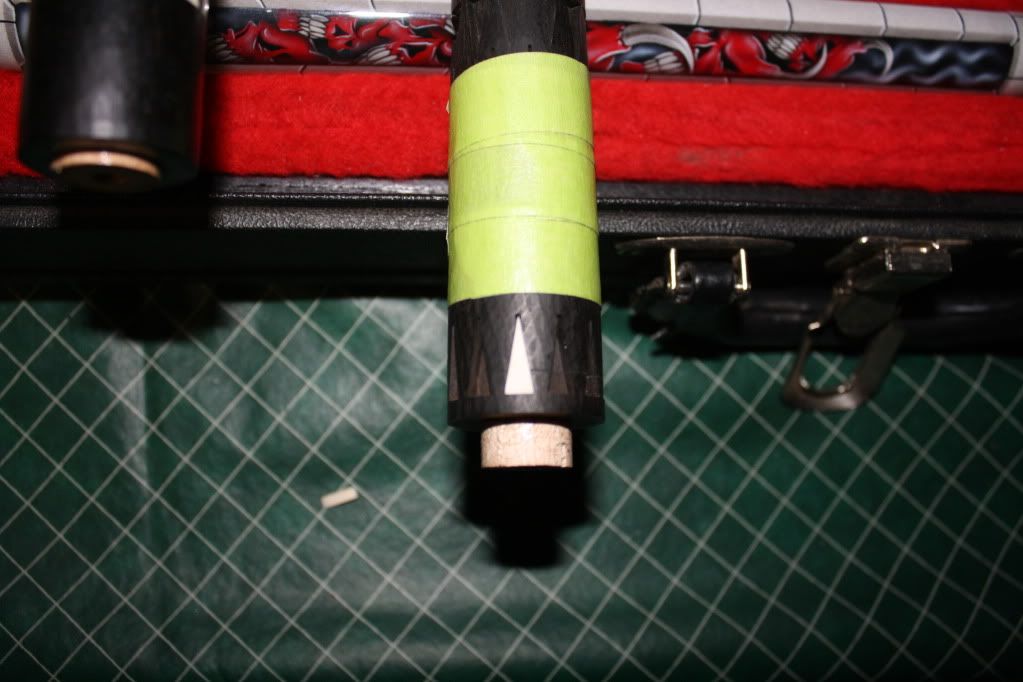
IMG_4069.jpg


Here is my amended pocket Geometry that I did last night. I rounded it for sharp corner insertion instead of my old slotting method. Live and learn!
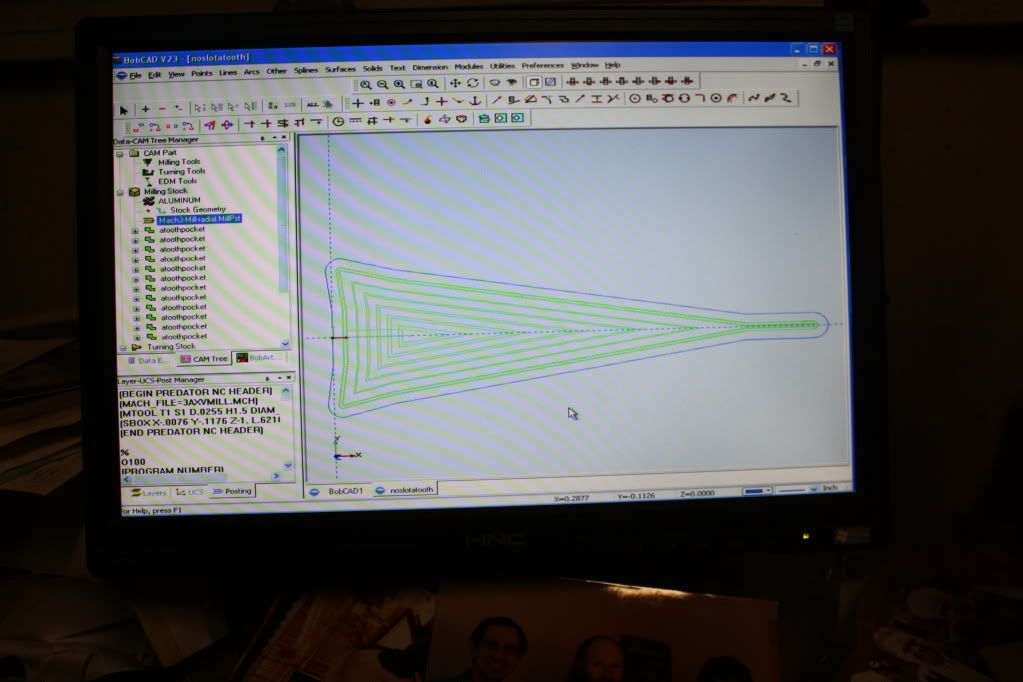
IMG_4066.jpg


Here is one of the maple test pieces that did not step out because it was softer than ebony and did not throw off steps. I needed that added to the mix like I needed a hole in my head.
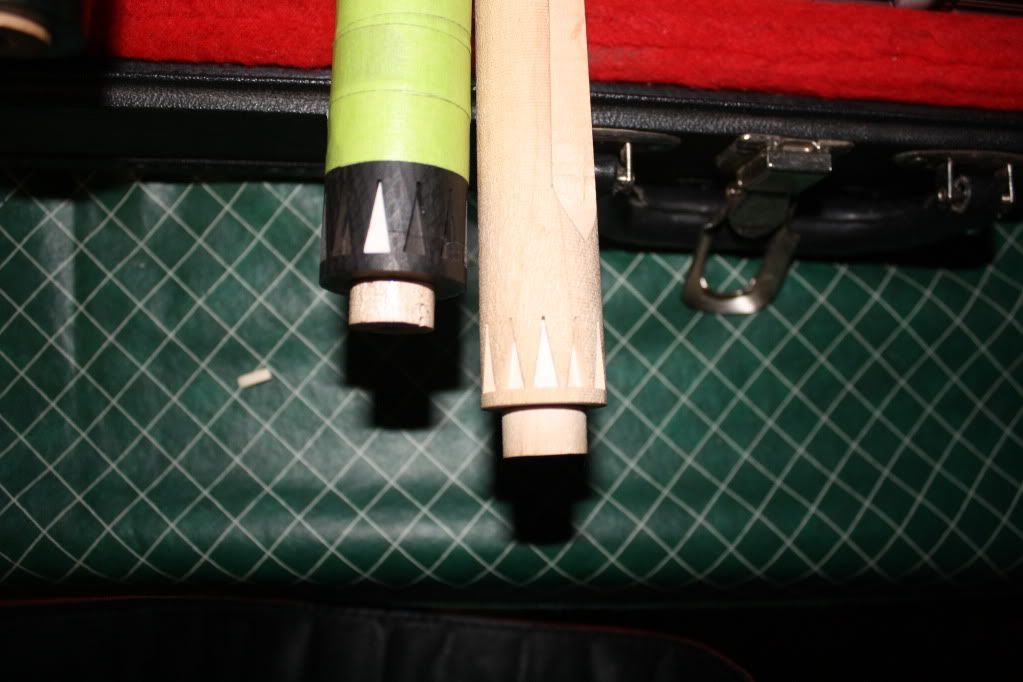
IMG_4070.jpg


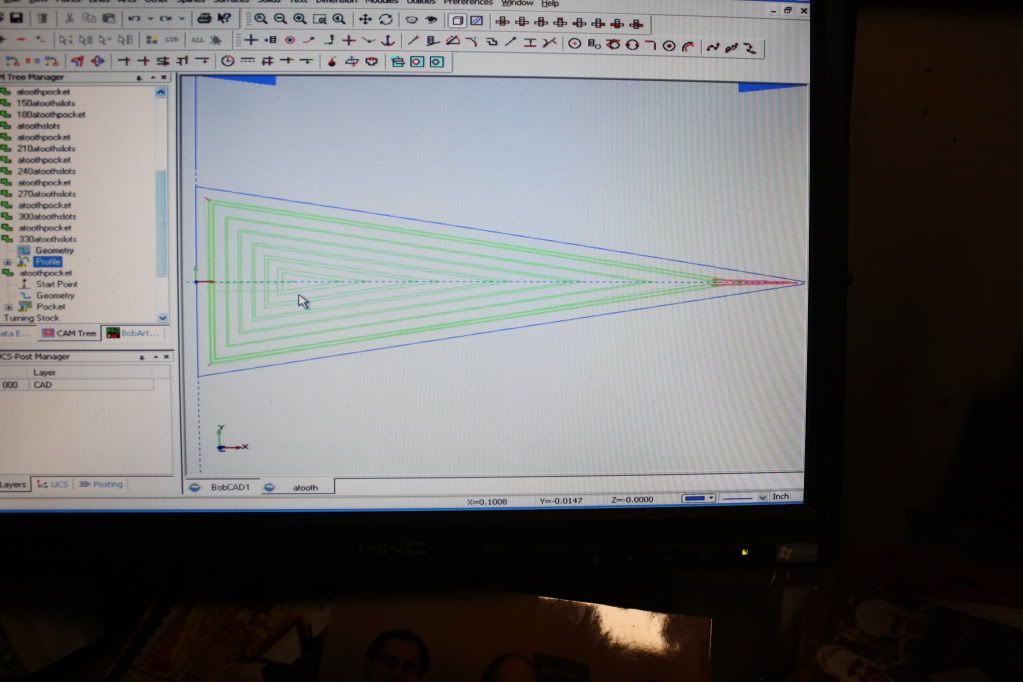
Here is my old geometry that used profile lines to extend the pocket allowing sharp corner insertion. RIP !!!
IMG_4068.jpg
 
Last edited:
[...]

I was slipping steps on my X because I was using profile slots in the pocket corners so my sharp parts fit as a separate feature before cutting the pocket. [...]


I assume you're planning to mix black colorant with your epoxy [when you inlay your parts] so the epoxy will fill the gaps in your pockets, but why not just hand cut sharp corners and get a perfect fit instead?

Filling over-cut corners with colored epoxy used to be a standard technique - like others I did that in the early years - but these days I thought most cuemakers would want to be more precise in their work. All you need is some razor-edged hand tools and a little bit of elbow grease, and then you won't be limited to inlaying sharp details into only ebony...

TW

Tipdetail-lo-res.jpg


I assume you're planning to mix black colorant with your epoxy [when you inlay your parts] so the epoxy will fill the gaps in your pockets, but why not just hand cut sharp corners and get a perfect fit instead?

Filling over-cut corners with colored epoxy used to be a standard technique - like others I did that in the early years - but these days I thought most cuemakers would want to be more precise in their work. All you need is some razor-edged hand tools and a little bit of elbow grease, and then you won't be limited to inlaying sharp details into only ebony...

TW


A little chisel work goes a long way, and it's easy to see who's doing the 'little things' to make perfect sharp pockets.

+1

-s
 
I am confused.

Sorry Rick, I am not buying it. You should not loose steps from cutting ebony at .125" 5 ipm. There is something else wrong. I do believe that X is missing steps. That bit should break long before causing missed steps. Is your X axis that weak that your 1/32 bit can stall it? You will want to investigate this further as your issue will come back.

Maybe I am wrong. How ever I bet I am not. By the way, I still don't understand why you would need so many features.


Jim.
 
I'm sorry Rick, but I have to agree with Jim. At least this time I do! LOL

Your machine should more than enough power to snap .03125" bits all day long. Not to mention that at 5" a minute any good bit will easily cut through any wood you'd be cutting. What kind of spindle are you using? What's the RPM?

As for the 36 or 72 features in your cam tree, there are much easier ways to get what you are building than creating a feature for each inlay. You could just post the code for one inlay, use it as a subroutine and hand code the rotational moves in between. There are lots of ways to do this that are much easier than creating 36 separate features, all for the same geometry.
 
Sorry Rick, I am not buying it. You should not loose steps from cutting ebony at .125" 5 ipm. There is something else wrong. I do believe that X is missing steps. That bit should break long before causing missed steps. Is your X axis that weak that your 1/32 bit can stall it? You will want to investigate this further as your issue will come back.

Maybe I am wrong. How ever I bet I am not. By the way, I still don't understand why you would need so many features.

I'm sorry Rick, but I have to agree with Jim. At least this time I do! LOL

Your machine should more than enough power to snap .03125" bits all day long. Not to mention that at 5" a minute any good bit will easily cut through any wood you'd be cutting. What kind of spindle are you using? What's the RPM?

As for the 36 or 72 features in your cam tree, there are much easier ways to get what you are building than creating a feature for each inlay. You could just post the code for one inlay, use it as a subroutine and hand code the rotational moves in between. There are lots of ways to do this that are much easier than creating 36 separate features, all for the same geometry.


Jim.

Hi Jim and Royce,

I don't doubt that you are correct in your observations but for the short term I am keeping my finger crossed and hoping for the best. There is a huge experience curve I need to overcome and I will take one step at a time. I just did 2 practice routines and just pocketed the cue with great results and no visible lost steps. I brought my motor velocities and accel back up and now I am getting paranoid waiting for it to fail again as I know you understand this stuff at a very high level.

When cutting the forward slot of the tooth at full depth (.125) I have been hearing a very high pitched scream from the cutter and because each pocket was stepping out evenly each time I am assuming I was out of the woods. Only time will tell if it raises it's ugly head again. Keeping my fingers crossed.

For now I am going to move slow, test and observe. I am using a NSK Spindle and I believe it is in the mid to high 20s for RPM. That may be a factor as I know some of you guys go way higher.

I have had the CNC for 6 years and to be honest with you I have been not putting the time into it other than some simple pockets single inlays here and there as I have been focusing on other aspects of the process control and playability part of my cue making.

This Orca II tribute cue is the first big cue for me and has captivated me to take the my CNC skills to the next level and I am officially addicted to this medium from here going forward. Having guys like you, TW and Royce take the time to comment and offer help is like me having Vince Lombardi draw the power sweep up on the board. Words can not express my gratitude.

As far as the posting a bunch of features in the cam tree, that was the way I figured out how to do it on my own. As soon as I finish this cue you can bet I will not be doing that extra work anymore because of your recommendations.

Thanks again,

Rick
 
Last edited:
Sorry Rick, I am not buying it. You should not loose steps from cutting ebony at .125" 5 ipm. There is something else wrong. I do believe that X is missing steps. That bit should break long before causing missed steps. Is your X axis that weak that your 1/32 bit can stall it? You will want to investigate this further as your issue will come back.

Maybe I am wrong. How ever I bet I am not. By the way, I still don't understand why you would need so many features.


Jim.
You think a reducer can help here Jim ?
Faster revolution by the stepper ( less clicks and more accurate ) then reducer reduces X lead screw revolution ?


I assume you're planning to mix black colorant with your epoxy [when you inlay your parts] so the epoxy will fill the gaps in your pockets, but why not just hand cut sharp corners and get a perfect fit instead?

Filling over-cut corners with colored epoxy used to be a standard technique - like others I did that in the early years - but these days I thought most cuemakers would want to be more precise in their work. All you need is some razor-edged hand tools and a little bit of elbow grease, and then you won't be limited to inlaying sharp details into only ebony...

TW


Hey TW,

Thanks for giving me a steer and some insight into some secrets of "Krell Land". I do wish to try your method but what you are talking about doing is artwork with a knife. I think I may have to do a little practicing to get the knife stroke confidence down as you describe. What seems simple and routine to you is a sweaty armpit job for me on a cue nearing a finish state with a lot of time invested. Like the priest said to Kane on the TV show Kung Fu, "When you can walk on the rice paper and not have left a mark, then you shall have learned Grasshopper".

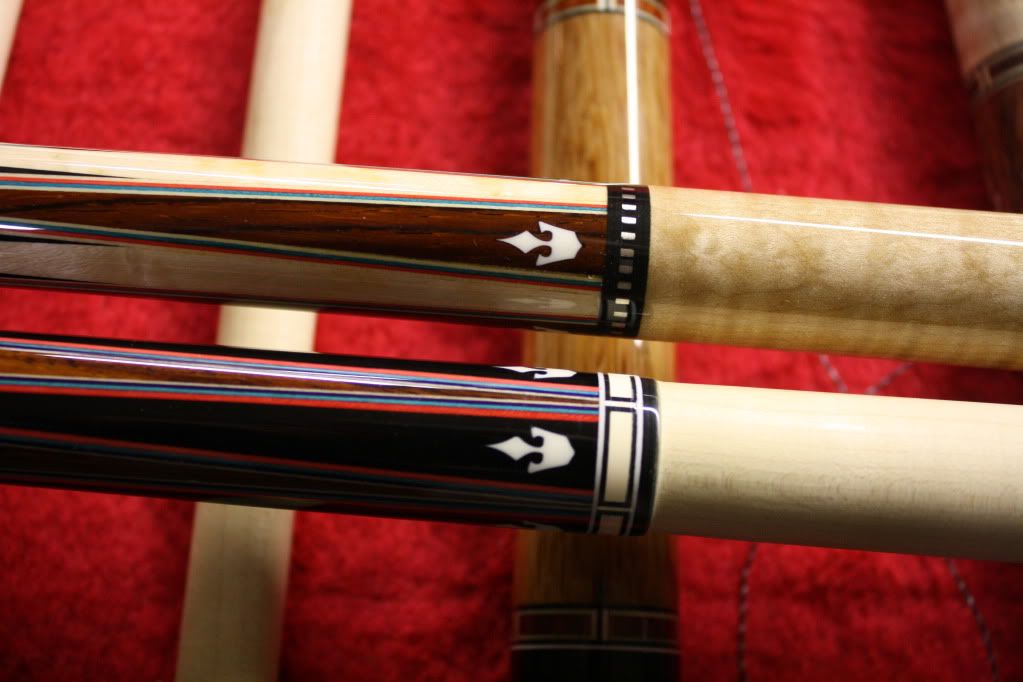
Here are a couple of my playing cues that I have in inventory that I am not selling because I am looking for long term observations in the pocket area that you are describing taking the scalpel too which i know will reduce epoxy fill volume. My good friend "Mr. Hoppe" designed the inlay shown and performed the work in my shop. So far in 5 months since I finished these cues, I don't see any shrinkage which has been a concern the I have been trying to prove in my process control over time.

I have had some minor problems in the past but since I went to the Loctite HySol, the shrinkage has not reared it's ugly head. (Yet?) This epoxy takes 36 hours to cure and when you fill a ferrule with it to the top and wait 3 days, it is hard to get a center punch to grab when hitting the hammer. Great stuff.

The Ivory into ebony has no pigment and the gap can not be seen. On the cocobolo one we had to mix up some sauce.

BTW, Thanks for taking some time to interface here on AZ. Every post you have made in recent weeks has steered my ship on a different coarse regarding some fine tuning details you have revealed, which is what cue making is all about.

Thank you for sharing,

Rick

IMG_4076.jpg
 
Last edited:
Hey TW,

Thanks for giving me a steer and some insight into some secrets of "Krell Land". I do wish to try your method but what you are talking about doing is artwork with a knife. I think I may have to do a little practicing to get the knife stroke confidence down as you describe. What seems simple and routine to you is a sweaty armpit job for me on a cue nearing a finish state with a lot of time invested. Like the priest said to Kane on the TV show Kung Fu, "When you can walk on the rice paper and not have left a mark, then you shall have learned Grasshopper".

[...]

Wow, a Forbidden Planet reference! Don't see that too often.

You're already cutting test runs on plain maple dummy cues - a commendable thing, btw. Since you've got the sacrificial maple blank anyway, cut a few pockets without the glue relief corners and there you have it - plenty of corner-chiseling practice fodder.

And finally, the Shaolin Priest on Kung Fu should have told Caine, "Oh yeah by the way, if you ever happen to find yourself spanking the monkey in a Bangkok hotel room, go ahead leave your belt in your trousers. And if you're not playing alone, for God's sake don't make your safe word "Keep going!"...

TW


Wow, a Forbidden Planet reference! Don't see that too often.

You're already cutting test runs on plain maple dummy cues - a commendable thing, btw. Since you've got the sacrificial maple blank anyway, cut a few pockets without the glue relief corners and there you have it - plenty of corner-chiseling practice fodder.

And finally, the Shaolin Priest on Kung Fu should have told Caine, "Oh yeah by the way, if you ever happen to find yourself spanking the monkey in a Bangkok hotel room, go ahead leave your belt in your trousers. And if you're not playing alone, for God's sake don't make your safe word "Keep going!"...

TW

LOL, I like this guy.

Jim.
 
cnc

I'm with Jim and Royce, no way should you be stalling a motor.
I noticed on the top of your program a few things that tweaked my
interest. First, why is T1 listed at .0255 if you are using a .0313 endmill.
Second, if you are using the saved feature function in Bobcad, make sure
the post processor isn't slipping in some G90 and G91 switches. I had it do
it to me. It's amazing what a one or two line change from absolute to
incremental back to absolute can do to ruin your day.
 
When cutting the forward slot of the tooth at full depth (.125) I have been hearing a very high pitched scream from the cutter and because each pocket was stepping out evenly each time I am assuming I was out of the woods. Only time will tell if it raises it's ugly head again. Keeping my fingers crossed.

I am willing to bet that the high pitch scream your hearing is not comming from your cutter but from a mis-alignment in your lead nut and lead screw in your x axis..
 
Coupler? Bearing? Motor? You gotta find the weakest link in the chain Rick. Too bad it's not still doing it, then you could find it at least. Since it dissappeared, how about running the same program at different positions on your X axis?
 
I'm with Jim and Royce, no way should you be stalling a motor.
I noticed on the top of your program a few things that tweaked my
interest. First, why is T1 listed at .0255 if you are using a .0313 endmill.
Second, if you are using the saved feature function in Bobcad, make sure
the post processor isn't slipping in some G90 and G91 switches. I had it do
it to me. It's amazing what a one or two line change from absolute to
incremental back to absolute can do to ruin your day.

Steve,

I will check the G90 & G91 switches.

The .0255 is the manual information I put in BobCad to compensate the slot. I believe that I put in .026 or .027 to compensate the pocket for the part to fit. I just added another half a thou. on the slots to make shure they went out side the corners after the pockets was compensated.

Thanks for steer me to the switches, I will keep a weather eye out for that situation.

I am getting ready to test 84 inlays in a 2.5 inch section today. If they run out, your tip will be something I look at first.

Thanks,

Rick
 
cnc

It's amazing all the little things that can be hidden in the code.
One thing that I do is cut all my parts with the actual tool size.
Then all the compensation is in the pocket. It looked like you were doing
a clean up pass. That's where I tweak the endmill size to get the fit I like.
With this method I can get a pretty good idea what tolerances I'm working with on the machine. It also cuts down on the trial and error on future
parts. On a new design, I cut the parts, then start tweaking the pocket until I get the fit I want. If you ever get a Haas, they have a feature where you can tweak the tool size right at the machine, and not have to
rewrite the code for it. Machine compensation is a wonderful thing, but my
Techno doesn't recognize those G codes. For reference, the Techno with an NSK spindle works pretty good with a .020 cutter set at .020 for parts and .018 for pockets.
 
It's amazing all the little things that can be hidden in the code.
One thing that I do is cut all my parts with the actual tool size.
Then all the compensation is in the pocket. It looked like you were doing
a clean up pass. That's where I tweak the endmill size to get the fit I like.
With this method I can get a pretty good idea what tolerances I'm working with on the machine. It also cuts down on the trial and error on future
parts. On a new design, I cut the parts, then start tweaking the pocket until I get the fit I want. If you ever get a Haas, they have a feature where you can tweak the tool size right at the machine, and not have to
rewrite the code for it. Machine compensation is a wonderful thing, but my
Techno doesn't recognize those G codes. For reference, the Techno with an NSK spindle works pretty good with a .020 cutter set at .020 for parts and .018 for pockets.

Steve,

That's a great tip. I will start compensating on the clean up pass that makes a lot of sense.

Thanks,

Rick
 
Compensating on the pocket makes sense to me, but using the clean-up pass to do it does not. Assuming that you mill your cean-up pass conventionally, the bit tends to deflects into the material, and the depth of the cut needs to balance that diflection with the cutting resistance of the material. To get consistent results, I would rather compensate on the rough cut, then use a precise depth of finish pass calculated using the cutter size and your experience with the cutting resistance of the material. Using 1/8 your tool diameter is a standard place to start.
 
Compensating on the pocket makes sense to me, but using the clean-up pass to do it does not. Assuming that you mill your cean-up pass conventionally, the bit tends to deflects into the material, and the depth of the cut needs to balance that diflection with the cutting resistance of the material. To get consistent results, I would rather compensate on the rough cut, then use a precise depth of finish pass calculated using the cutter size and your experience with the cutting resistance of the material. Using 1/8 your tool diameter is a standard place to start.

So you are saying that .003 vs .002 clean up pass is going to deflect the
carbide cutter. Sorry, but I don't agree.
 
Back
Top